
Hugo from local to website
This note walks through a practical way to deploy a Hugo website from your development PC to a live server, using GitHub as the bridge and automation layer. It helps you put in place a clean workflow for building locally, versioning your site, and pushing updates to production with as little manual work as possible.

Plan / Strategy
- Initial state - The hugo website runs fine on your computer
- Step 1 : Establish the PC-GitHub link
- Step 2 : Get you server’s data
Step 1 : PC-Github link
- Open your GitHub account
- Create an empty repo for the project (dev. files and website)
- On your PC, go in the project folder and open the PowerShell and use the commands shown in the repo you just created to push everything:

- Now, each time you make updates, on your website, you can push it all just by going in this folder and running the push command
1git commit -m "I have done this and that since last time"
2git push -u origin main
Step 2 : Get server’s data
- On infomaniak find the following page get the following informations
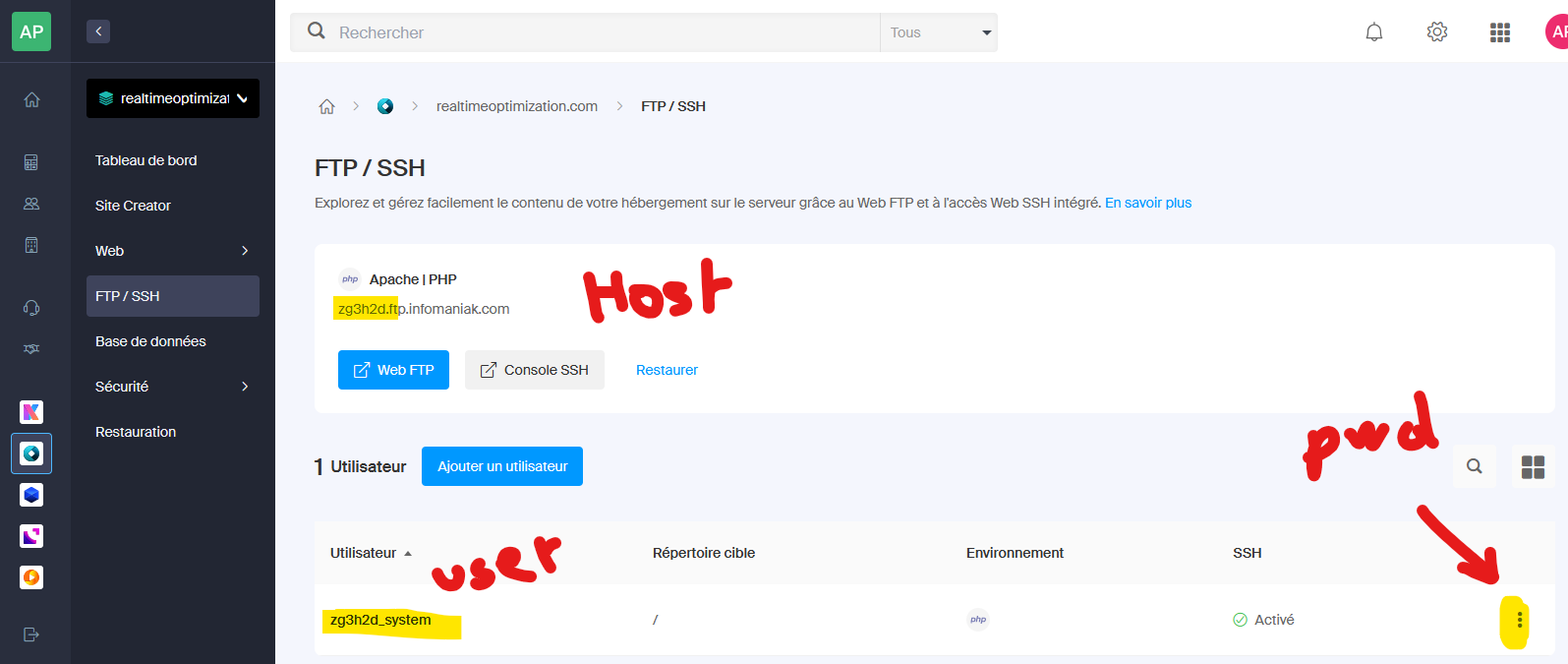
- Open the server on your PowerShell :
1ssh UserName@HostName
2# in my case : ssh zg3h2d_system@zg3h2d.ftp.infomaniak.com
3
4# then you will be asked to provide this user's password
5# then you are on the server
Once inside, use the following command to get the exact address of your “bare repo”, i.e., your folder on this server :
1# command to get the pathway to the current folder
2pwd
3# in my case it returne : /home/clients/acafed5b944f38fd1e62d5447dc470dd
tst tst